Cloudflare Tunnel链接错误排查

一大早Cloudflare Tunnel忽然坏掉了。 修复结论:除了检查QUIC协议是否被屏蔽之外,也查一下本机时间同步。

T00:33:53Z INF Retrying connection in up to 1m4s connIndex=0 event=0 ip=198.18.0.134 
2026-01-06T00:33:54Z WRN If this log occurs persistently, and cloudflared is unable to connect to Cloudflare Network with `quic` protocol, then most likely your machine/network is getting its egress UDP to port 7844 (or others) blocked or dropped. Make sure to allow egress connectivity as per https://developers.cloudflare.com/cloudflare-one/connections/connect-apps/configuration/ports-and-ips/ If you are using private routing to this Tunnel, then ICMP, UDP (and Private DNS Resolution) will not work unless your cloudflared can connect with Cloudflare Network with `quic`. connIndex=0 event=0 ip=198.18.0.134 
2026-01-06T00:33:54Z INF Switching to fallback protocol http2 connIndex=0 event=0 ip=198.18.0.134 
2026-01-06T00:35:52Z ERR Serve tunnel error error="TLS handshake with edge error: EOF" connIndex=0 event=0 ip=198.18.0.134 2026-01-06T00:35:52Z INF Retrying connection in up to 1m4s connIndex=0 event=0 ip=198.18.0.134 2026-01-06T00:36:17Z ERR Unable to establish connection with Cloudflare edge error="TLS handshake with edge error: EOF" connIndex=0 event=0 ip=198.18.4.32 2026-01-06T00:36:17Z ERR Serve tunnel error error="TLS handshake with edge error: EOF" 
connIndex=0 event=0 ip=198.18.4.32 2026-01-06T00:36:17Z INF Retrying connection in up to 1m4s connIndex=0 event=0 ip=198.18.4.32

最先想到的是服务商突然屏蔽了QUIC 协议(基于 UDP 端口 7844),准备开始查资料看能否代理。 后来检查中,发现windows时间同步是三天前,手工同步time.windows.com一直失败。 再后来,发现是之前一次代理规则调整不当,造成了时间同步失败。之后本地时间不准确,造成TLS handshake失败。
检测mysql是否运行,如崩溃自动重启

最好的办法,当然是从根源上避免程序崩溃。
但是在一个512M内存的小服务器上,数据库崩溃还是无法完全避免。
方法一
做个脚本。不过这个方法有点绕远了。
#!/bin/bash
if (( $(ps -ef | grep -v grep | grep mysqld | wc -l) <= 0 ))
then
   echo “MySQL is currently not running and will be restarted!” | mail -s “MySQL may have crashed” -r [email protected] to@dingxuan.info
   service mysqld restart
else
   echo “Running”
fi
加入crontab
*/5 * * * * /root/mysql_monitor.sh
方法二
比前一种更简洁。首先,可以测试一下数据库运行状态。mysqld 或者mariadb
/sbin/service mysqld status
echo $?
如果返回值不是0,说明运行状态异常。所以可以用这个作为判断依据,来控制是否执行启动命令。
/sbin/service mysqld status || service mysqld start
加到crontab里,每分钟运行一次。
* * * * * /sbin/service mysqld status || service mysqld start
延伸:测试apache运行状态
同理,要测试如无法访问某网址,则重启apache:
*/2     *       *       *       *       wget -q dingxuan.info || service httpd restart

10个免费的服务器监控工具

via:sixrevisions.com,本文由 Specs 翻译整理,发布在 WEB资源网

链接:http://webres.wang/free-server-monitoring-tools/ (点击尾部阅读原文前往)

原文:http://sixrevisions.com/tools/free-server-monitoring-tools/

监控你的Web服务器或者Web主机运行是否正常与健康是非常重要的。你要确保用户始终可以打开你的网站并且网速不慢。服务器监控工具允许你收集和分析有关你的Web服务器的数据。

有许多非常好的服务器监控解决方案,而为了省去你寻找方案的麻烦,这里我为你列出了我能找到的最好的服务器监控工具。

1.Performance Co-Pilot

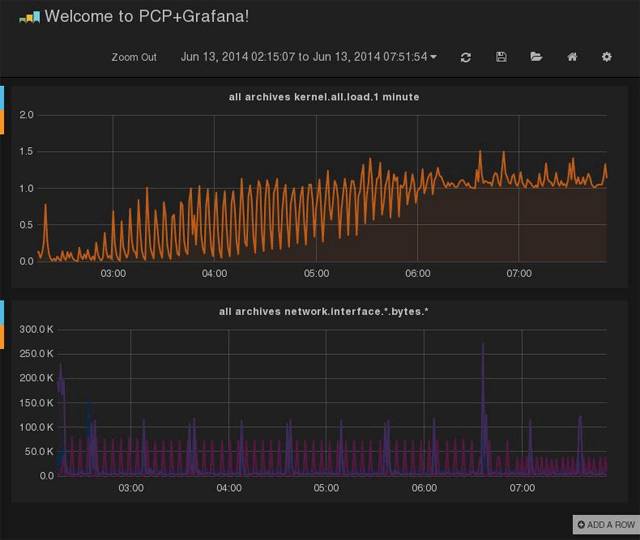
Performance Co-Pilot,简称 PCP,是一个系统性能和分析框架。它从多个主机整理数据并实时的分析,帮你识别不正常的表现模式。它也提供 API 让你设计自己的监控和报告解决方案。

继续阅读10个免费的服务器监控工具

你值得拥有——25个Linux性能监控工具

一段时间以来,我们在网上向读者介绍了如何为Linux以及类Linux操作系统配置多种不同的性能监控工具。在这篇文章中我们将罗列一系列使用最频繁的性能监控工具,并对介绍到的每一个工具提供了相应的简介链接,大致将其划分为两类,基于命令行的和提供图形化接口的。

基于命令行的性能监控工具

1. dstat – 多类型资源统计工具

继续阅读你值得拥有——25个Linux性能监控工具

CentOS 6 Web服务器迁移

一台老服务器用了5年了。为了保证稳定性,在它出毛病之前,预先换台新服务器。
本文记录了服务器迁移的全部过程。
本文档参考了本文的大纲:
同时在实践工作中,加入了自己的方法和经验。
全部内容分为以下几部分
  1. 建立用户
  2. 复制网站目录
  3. 修改本地hosts文件,准备测试
  4. 安装所有必要程序
  5. 复制程序配置文件
  6. MySQL数据迁移
  7. MYSQL数据迁移后,原主机上数据有更新怎么办?
  8. MYSQL数据迁移后,如何验证数据相符?
  9. 拷贝常用管理脚本
  10. 拷贝crontab
继续阅读CentOS 6 Web服务器迁移